
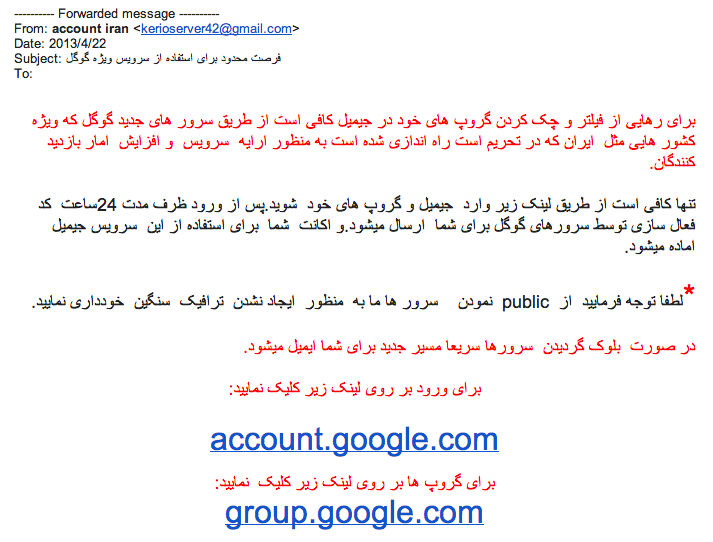
This is part of our tech tips and troubleshooting hub. Phishing, fraudulent messages designed to trick you into revealing sensitive information or installing malware, remains one of the most common ways people actually get compromised online, more often than any sophisticated technical attack. Here’s how to spot it.
The core pattern: urgency plus impersonation
Nearly every phishing attempt combines two elements: impersonating a trusted sender (a bank, a well-known company, a coworker, or a government agency) and creating artificial urgency (your account will be suspended, a payment failed, immediate action required). Legitimate organizations rarely demand instant action through an unsolicited message; recognizing this combined pattern is more useful than memorizing any specific scam format, since specific tactics evolve constantly.

Checking the actual sender address, not just the display name
A message can display “Amazon Support” or a colleague’s name while actually originating from a completely unrelated email address; checking the full sender address (not just the friendly display name shown by default) reveals many phishing attempts immediately. On both desktop and mobile email clients, tapping or hovering on the sender’s name typically reveals the actual underlying address.
Hovering over links before clicking
On desktop, hovering your cursor over a link (without clicking) typically shows the actual destination URL in your browser or email client’s status bar, often revealing a completely different domain than the text or button suggests. On mobile, a long-press on a link typically shows a preview of the actual destination before you commit to opening it. This single habit catches a large share of phishing attempts that would otherwise look legitimate at a glance.
Being suspicious of unexpected attachments
An unexpected attachment, especially one you weren’t anticipating from a sender you do recognize, warrants real caution even if the rest of the message looks legitimate; a compromised contact’s account is a common vector for spreading malware through what looks like a trusted source. When in doubt, confirm through a separate communication channel (a phone call, a message on a different platform) before opening an unexpected attachment.
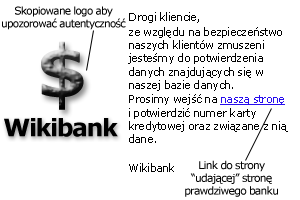
Verifying independently rather than using contact info from the suspicious message itself
If a message claims to be from your bank and asks you to call a number or click a link to “verify” something, don’t use the contact information provided in that message; instead, look up the organization’s official number or website independently (from a bill, a card, or a direct web search) and contact them that way. Phishing messages often include fake contact details that route directly back to the scammer.
What to do if you’ve already clicked or entered information
If you’ve clicked a phishing link but haven’t entered any information, close the page and consider running a security scan as a precaution. If you’ve actually entered a password or financial information, change that password immediately (on the legitimate site, accessed independently, not through the phishing link), enable two-factor authentication if not already active, and monitor the relevant account closely for unauthorized activity, and consider a password manager (covered in our password managers guide) so a single compromised password doesn’t cascade to other accounts.
Reporting phishing attempts
Most email providers include a “report phishing” option directly in the interface, which helps improve spam filtering for everyone, not just you. In the US, the Federal Trade Commission and the Cybersecurity and Infrastructure Security Agency both provide guidance and reporting channels for phishing and broader online scams, worth knowing about beyond just your email provider’s built-in reporting.
Phishing targeting businesses specifically
Beyond individual consumer targeting, businesses face a specific, costly variant often called business email compromise, where an attacker impersonates an executive or vendor to trick an employee into an unauthorized wire transfer or sensitive data disclosure. These attempts are often more carefully researched and personalized than mass consumer phishing, worth specific awareness training for anyone in a business role handling payments or sensitive data, since the generic “look for typos” advice is less reliable against a well-researched, targeted attempt.
Voice and video-based scams: an evolving variant
Phone-based scams impersonating a bank or government agency, and increasingly, AI-generated voice cloning impersonating a specific known person, extend the same core phishing pattern (urgency, impersonation) beyond text messages into calls. The same underlying defense applies: independently verify through a channel you initiated yourself rather than trusting caller ID or a familiar-sounding voice alone, since both can now be convincingly faked.
Common mistakes that make people vulnerable
Acting quickly under the message’s induced urgency, exactly the response phishing is designed to trigger, before pausing to check the sender and links, is the single most common way people get caught even when they’re generally cautious. The other common mistake is assuming phishing only targets less tech-savvy people; sophisticated, well-crafted phishing attempts target everyone, and staying current on evolving tactics matters regardless of general tech comfort.
Related reading
Back to the full tech tips and troubleshooting hub, our guide to best password managers for limiting the damage of a compromised password, and setting up a secure home Wi-Fi network for a related layer of everyday security.
Frequently asked questions
Can phishing happen through text messages, not just email?
Yes, this specific form is often called “smishing,” and it follows the same core pattern (urgency, impersonation) via SMS instead of email, worth watching for with the same caution, hovering over links less possible on some phones, so extra care with unexpected text links is warranted.
Are phishing attempts getting harder to spot?
Yes, particularly as AI tools make it easier to generate convincing, well-written, personalized messages that lack the grammatical errors that used to be a common giveaway. This makes the structural checks (sender address, actual link destination, independent verification) more important than ever, since surface polish is no longer a reliable signal of legitimacy.
What’s the difference between phishing and a regular scam?
Phishing specifically refers to attempts to steal information or credentials by impersonating a trusted entity, usually through a message; “scam” is a broader term covering many fraud types, some of which don’t involve impersonation or digital messages at all.


