
This is part of our complete web hosting buyer’s guide. Website security spans a range from the now-mandatory (an SSL certificate) to genuinely optional layers depending on a site’s size and risk profile. Here’s what actually matters for a typical small business or content site.
SSL certificates: no longer optional
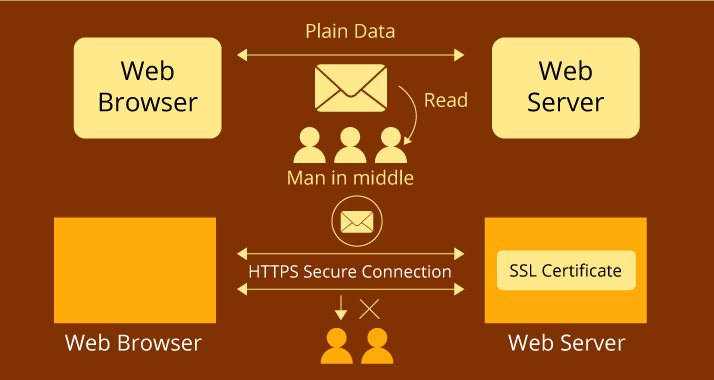
An SSL certificate encrypts traffic between a visitor’s browser and your server, and it’s signaled to visitors as the padlock icon and “https” in the address bar. Browsers now actively warn visitors when a site lacks one, a real trust and conversion problem, not just a technical nicety. Let’s Encrypt provides genuinely free, automated SSL certificates that most hosts now include by default, which means there’s essentially no remaining excuse for any site to run without one.

Cloudflare: a free layer of protection and speed
Cloudflare sits between your visitors and your server, filtering malicious traffic (including automated attacks and bots) before it reaches your site, while also caching content to improve load speed. Its free tier is genuinely useful for a small site, not a crippled trial, making it one of the highest-value, lowest-effort additions on this entire list.
Sucuri: dedicated malware scanning and cleanup
Sucuri specializes specifically in malware detection, cleanup, and a web application firewall, valuable particularly for a WordPress site given how often outdated plugins become a specific point of compromise. Its paid plans include actual cleanup service if a site does get compromised, a meaningful safety net beyond just prevention.

Comparison
| Tool | What it does | Free tier? |
|---|---|---|
| Let’s Encrypt | Free SSL certificates | Yes, fully free |
| Cloudflare | Attack filtering, caching, speed | Yes |
| Sucuri | Malware scanning and cleanup | Limited free scanner |
The baseline every site needs, regardless of size
At minimum: a valid SSL certificate (essentially free and automatic with any reputable host now), your platform and plugins kept genuinely up to date rather than postponed, and strong, unique admin credentials paired with a password manager (see our password managers guide). This baseline alone prevents the large majority of common, opportunistic attacks that target outdated software and weak credentials rather than sophisticated, targeted intrusion.
When to add a dedicated security layer like Cloudflare or Sucuri
A simple brochure site with low traffic and no sensitive data collection can often get by on the baseline above alone. A site handling customer data, payment information, or user accounts, or one that’s experienced any prior security incident, benefits meaningfully from adding Cloudflare’s filtering and a dedicated scanning tool like Sucuri on top of the baseline. Risk and value at stake, not site size alone, should drive this decision.
Backups: the last line of defense
Even with strong preventive security, maintaining regular, tested backups (covered in more depth in our cloud storage and backup guide) is what actually lets you recover cleanly if a compromise or a serious technical failure does happen. Security prevention and backup recovery are complementary, not substitutes for each other, and a site with excellent prevention but no real backup strategy is still one bad incident away from serious, possibly permanent, data loss.
Two-factor authentication for admin access
Beyond a strong password, enabling two-factor authentication on your site’s admin login, requiring a second verification step beyond just the password, closes off one of the most common ways sites actually get compromised: a guessed or leaked admin password used directly against a login page. Most WordPress security plugins and many hosts now support this directly, and it’s a genuinely low-effort addition relative to the protection it provides.
Web application firewalls, explained simply
A web application firewall (the “WAF” in many security tool names, including features within Cloudflare and Sucuri) inspects incoming traffic and blocks requests matching known attack patterns before they ever reach your site’s actual code. Think of it as a filter checking visitors at the door rather than trusting your site’s own code to correctly handle every possible malicious input, a meaningful additional layer beyond just keeping software updated.
Security for e-commerce and sites handling payment data
A site processing payments directly (rather than through a fully hosted checkout like Shopify’s) has additional compliance obligations (PCI DSS) around how payment data is handled, well beyond the general security baseline covered here. Most small businesses avoid this complexity entirely by using a payment processor’s hosted checkout rather than handling raw card data on their own server, worth confirming your specific e-commerce setup does this correctly rather than assuming.
Common mistakes in website security
Treating security as a one-time setup task rather than ongoing maintenance is the most common failure; software update reminders get postponed repeatedly until a known, published vulnerability in an old plugin version becomes the actual entry point for an attack. The second common mistake is assuming a small, low-traffic site isn’t a worthwhile target; in reality, most opportunistic attacks are automated and scan broadly for known vulnerabilities regardless of a site’s size or apparent importance, not targeted specifically at high-profile sites.
Related reading
Back to the full web hosting buyer’s guide, our guide to best password managers, and best cloud storage and backup services for the recovery side of this equation.
Frequently asked questions
Does every site need an SSL certificate, even a simple blog?
Yes. Beyond the security benefit, browsers now flag non-HTTPS sites as “not secure” to visitors, a real trust and credibility cost, and search engines factor HTTPS into ranking considerations as well.
Is Cloudflare’s free tier actually sufficient, or do I need to pay?
For most small to medium sites, the free tier provides genuinely meaningful protection and speed benefits; paid tiers add more advanced rules and support, worth considering once a site handles more sensitive data or faces more sophisticated threats.
How do I know if my site has already been compromised?
Warning signs include unexpected content changes, search engines flagging the site as unsafe, unusual outbound traffic, or hosting support flagging suspicious activity. A tool like Sucuri’s scanner can check proactively rather than waiting to notice symptoms yourself.



[…] Best Website Security Tools & SSL Certificates […]
[…] Best Website Security Tools & SSL Certificates […]